Exporting data in inmotek
Exporting data in Inmotek
Inmotek sometimes experiences overload when exporting property files according to specific filters, resulting in large documents. To address this slowdown in bulk exports, a new export method has been added that sends the file to the user's email address in the desired format and with the established filters within a maximum of 15 minutes. This prevents session lock-up caused by these complex exports.
The use of this tool adds to the current functionality that allows the instant download of smaller files, which remains unchanged.
Important: Email delivery is only mandatory when the results (number of lines x number of columns) are equal to or greater than 10,000. In other words, for small exports, you can choose not to select "email delivery," and the file will be downloaded immediately.
To use these exports, simply go to the CUSTOMERS, SALES or RENTAL section, as appropriate, and select the Export option in the top bar .
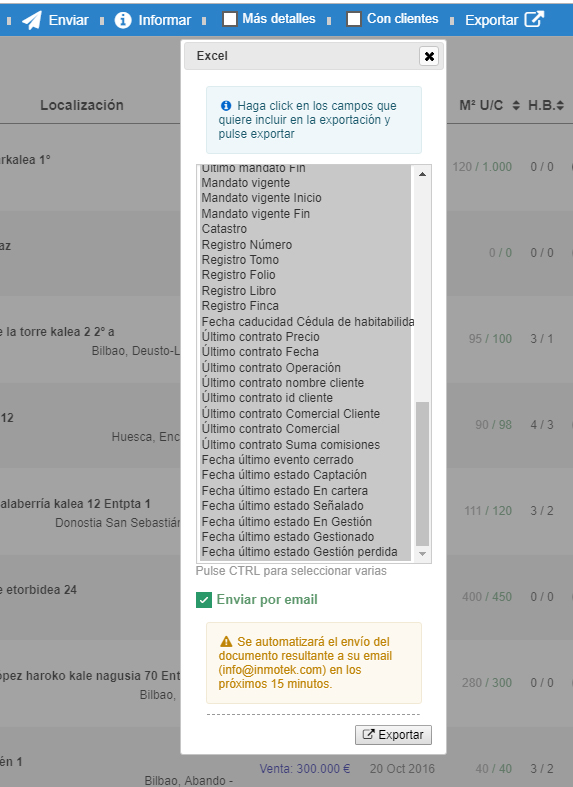
By selecting the "Send by email" option, an email will be sent with the file in the chosen format and with the selected fields to the email account configured for the user making the request.
The main reason we developed this feature is that websites can't process and deliver massive amounts of data instantly. That's why this task is entrusted to servers. These "stress-free" servers process all that information and return it—in this case, as an email to your address every 15 minutes. This tool was created to ensure reliable data exports.
Remember: You don't need to wait to receive one import before making another, so if you have several things to export, do them all at once and they will arrive in no more than 15 minutes.